BLZ INO200 Intraoral Scanner: Scanning for Orthodontics - Scanning Techniques
Optimize orthodontic workflows with the BLZ INO 200 intraoral scan, exploring the Smart Dent Academy platform for clinical efficiency.
Optimize orthodontic workflows with the BLZ INO 200 intraoral scan, exploring the Smart Dent Academy platform for clinical efficiency.
BLZ INO200 Intraoral Scanner: Scanning for Orthodontics – Scanning Techniques
Every dental professional knows that time in the clinic is a valuable resource. Every minute spent on manual processes is one less minute dedicated to the patient, or to optimizing the routine. The wait for impressions, the risk of material distortion, and the need for repeated procedures are realities that directly impact productivity and satisfaction. The search for a more agile, precise, and predictable workflow is not a luxury, but a necessity for those seeking excellence and efficiency.
📊 Quick Technical Summary
The BLZ INO200 Intraoral Scanner optimizes the orthodontic workflow with its fast and accurate scanning capability, generating 3D models in real colors. Weighing only 270 g, it facilitates data acquisition and integration with open software, such as BLZ Dental, which guides the professional through scanning techniques like the S-technique, essential for orthodontics.
- Weight: 270 g
- Scanning Time (full arch): < 40 seconds
- Scanning Depth (Deep Scan): 25 mm
- Supported Formats: STL, PLY, OBJ
- Application: Orthodontics, restorations, surgical planning.
It is a universal truth in dentistry that the accuracy of initial data defines the quality of the final work. A good diagnosis depends on exact information. And often, what seems like a saving at the beginning turns into a hidden cost of rework or dissatisfaction. That moment of uncertainty, of wondering if the impression was perfect, if the lab will have all the necessary details for orthodontic planning, is a silent pain that many professionals carry.
Especially in orthodontics, where monitoring and treatment sequence are crucial, having a reliable digital starting point makes all the difference. Delivering a plan based on digital data is not just modernity, it's security. The ability to review a scan, refine areas, and ensure every detail is there, even before sending the case, changes the game.
🔬 The Revolution of Scanning in Orthodontics
The transition from analog to digital is no longer a trend; it is the established reality for those seeking optimization. Choosing equipment that easily integrates into your digital workflow, that understands the reality of the clinic and the lab, is fundamental. It's not enough to scan; the scanner must offer more than just an image, but a path to the most assertive decision.
With this in mind, the BLZ INO200 Intraoral Scanner emerges as a tool designed for daily clinical use, with a compact and lightweight design, weighing only 270 g. Its agility is remarkable, allowing full arch scanning in less than 40 seconds. This speed is crucial for patient comfort and the efficiency of the clinic's schedule.
The 25 mm scanning depth (Deep Scan) ensures the capture of important details, even in hard-to-reach areas, which is a differential in complex orthodontic cases. The ability to generate 3D models in real colors optimizes diagnosis and communication with the patient and the prosthetic lab. Compatibility with open formats such as STL, PLY, and OBJ allows integration with any dental CAD software and 3D printer, providing freedom and flexibility to your workflow.
The clinical tools embedded in the BLZ Dental software, such as occlusion detection and cervical margin adjustment, are developed to optimize planning and communication between the clinic and the lab, resulting in more personalized and effective treatments.
📋 Orthodontic Scanning Protocol with BLZ INO200
The BLZ Dental software, through the Smart Dent Academy, offers an intuitive guide for orthodontic scanning, ensuring that even those new to digital dentistry can operate with confidence.
📋 Orthodontic Scanning with the BLZ INO200 Scanner
This protocol details the process of scanning arches for orthodontic cases using the BLZ INO200 Intraoral Scanner and BLZ Dental software.
Required Materials and Equipment:
- BLZ INO200 Intraoral Scanner
- BLZ Dental Software (installed on a compatible computer)
- Training model or patient
Step-by-Step Procedure:
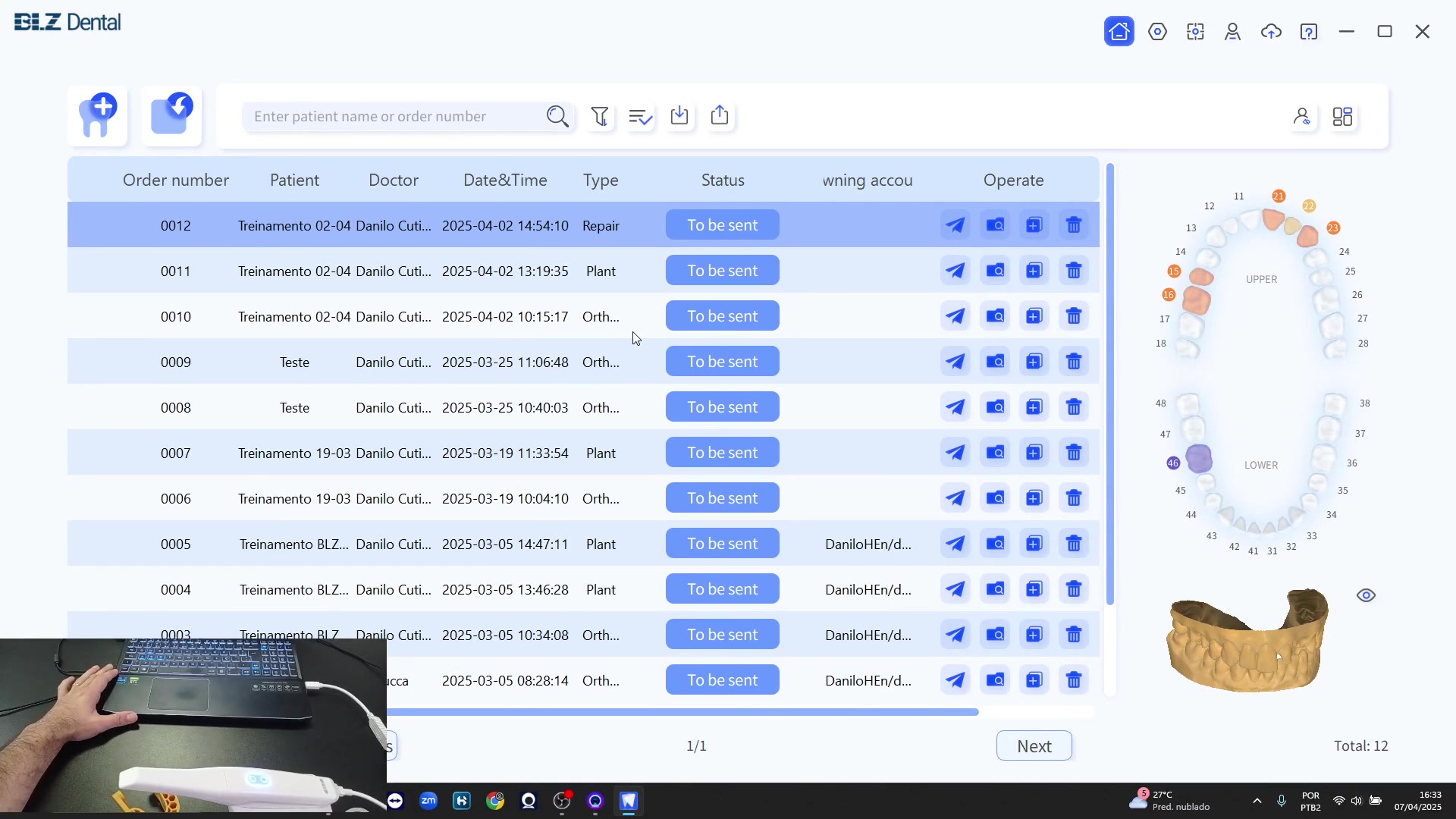
- Step 1: Start New Case Within the BLZ Dental software, click the button with a molar representation and a plus symbol to add a new case.
- Step 2: Register Patient Define the patient's name. You can add a new one or search for an existing one. The patient's name is the only required field.
- Step 3: Select Scanning Type In the upper right corner, define that the scan is for 'orthodontics'. Confirm and click 'Save'.
- Step 4: Start Scanning The screen will display a guide with the recommended scanning technique (S-technique). Close the guide and start scanning by clicking 'Scan'.
- Step 5: Maxillary Arch Scanning Use the S-technique, starting from a posterior region, covering the anterior, and completing the other posterior region. A simple click on the top button of the scanner starts and pauses the capture. Keep the scanner in constant motion. If you lose reference, return to an already scanned area for the software to reorient itself.
- Step 6: Maxillary Arch Review and Editing After completing the scan, review the image. Use the right mouse button to rotate, the scroll wheel to zoom in/out, and the scroll wheel click to drag. The eraser tool (third button on the left bar) allows you to erase excesses or flaws. Be careful not to cross the meshes when erasing.
- Step 7: Mandibular Arch Scanning Repeat the scanning and editing process for the mandibular arch, following the same technique and reviews.
- Step 8: Occlusion Scanning Perform three registrations: patient's left side, right side, and central region. Scan by capturing soft tissue and teeth of both arches in the desired position. The software will interrupt scanning when alignment is done.
- Step 9: Final Processing and Export Wait for the final image processing. Upon returning to the case definition page, double-click on the newly created case to access it. To export, click the folder icon with a magnifying glass to open the directory of files (.ply and .stl for maxillary and mandibular arches).
⚠️ Points of Attention:
- During scanning, if focus is lost, return to an already scanned region for scanner reorientation.
- The eraser tool is powerful, but use it with caution to avoid removing important parts of the mesh or crossing the model.
- Good mesh trimming after scanning reduces processing time and file size.
🏆 Authority and Scientific Compliance
The Smart Dent Academy, a digital literacy platform, reinforces the commitment to continuous education, ensuring that users of the BLZ INO200 Intraoral Scanner master the techniques and make the most of the equipment's potential. The constant updating of guides and tutorials reflects the dedication to offering high-level technical and educational support.
Choosing equipment like the BLZ INO200, which combines performance and usability, is a strategic decision. The ability to capture precise data and integrate it into a complete digital workflow, which can include 3D printers and 3D resins, is what defines the forefront of dentistry.
It is clarity, security in investment, and predictable financial return. The ability to perform detailed and uncomplicated scanning, with the guarantee that the data will be accepted by other software and equipment, eliminates the barrier of technology and converts it into a powerful ally for the professional. Clinical practice becomes more efficient, more precise, and, above all, more predictable.
In a scenario where efficiency and precision are competitive differentiators, adopting technologies that simplify the process and increase the quality of the result is crucial. The decision to incorporate an intraoral scanner into the practice is not just about purchasing equipment, but about choosing a work method that values the professional's time and the patient's health.
[[ASSINATURA_AUTOR]]Vídeos relacionados
Perguntas Frequentes
What is the main benefit of the BLZ INO200 Intraoral Scanner for orthodontics?
The BLZ INO200 Intraoral Scanner optimizes the orthodontic workflow, providing fast and accurate scanning.
How does the BLZ INO200 contribute to clinical productivity?
It reduces the time spent on manual processes, eliminates the need for physical impressions, and decreases the risk of material distortion, positively impacting productivity.
Where can I find more information about scanning techniques with the BLZ INO200?
The Smart Dent Academy platform is mentioned as a resource to explore clinical efficiency with the BLZ INO200.
What is the BLZ INO200 Intraoral Scanner?
It is equipment that optimizes the orthodontic workflow, allowing fast and accurate scanning to optimize the clinical routine.
What are the benefits of the BLZ INO200 for orthodontics?
It offers a more agile, precise, and predictable workflow, reducing the need for manual impressions and the risk of material distortion.
How does the BLZ INO200 contribute to clinical efficiency?
Through its fast and accurate scanning capability, it minimizes the time spent on manual processes, dedicating more time to the patient and optimizing the routine.
How does the BLZ INO200 Intraoral Scanner improve efficiency in orthodontics?
The BLZ INO200 Intraoral Scanner optimizes the orthodontic workflow with its fast and accurate scanning capability, leading to gains in productivity and satisfaction.
What problems do manual impression processes cause in the dental clinic?
Manual impression processes can lead to waiting times, risk of material distortion, and the need for repeated procedures, impacting productivity and patient satisfaction.
What does the Smart Dent Academy platform offer for orthodontic scanning?
The Smart Dent Academy platform offers optimization of orthodontic workflows with the BLZ INO 200 intraoral scan, aiming for clinical efficiency.