BLZ INO200 Intraoral Scanner: Dental Preparation Scanning (Pre-op) - Scanning Techniques
Explore dental preparation scanning with the BLZ INO200 for pre-operative cases. Watch the full demonstration at Smart Dente Academy.
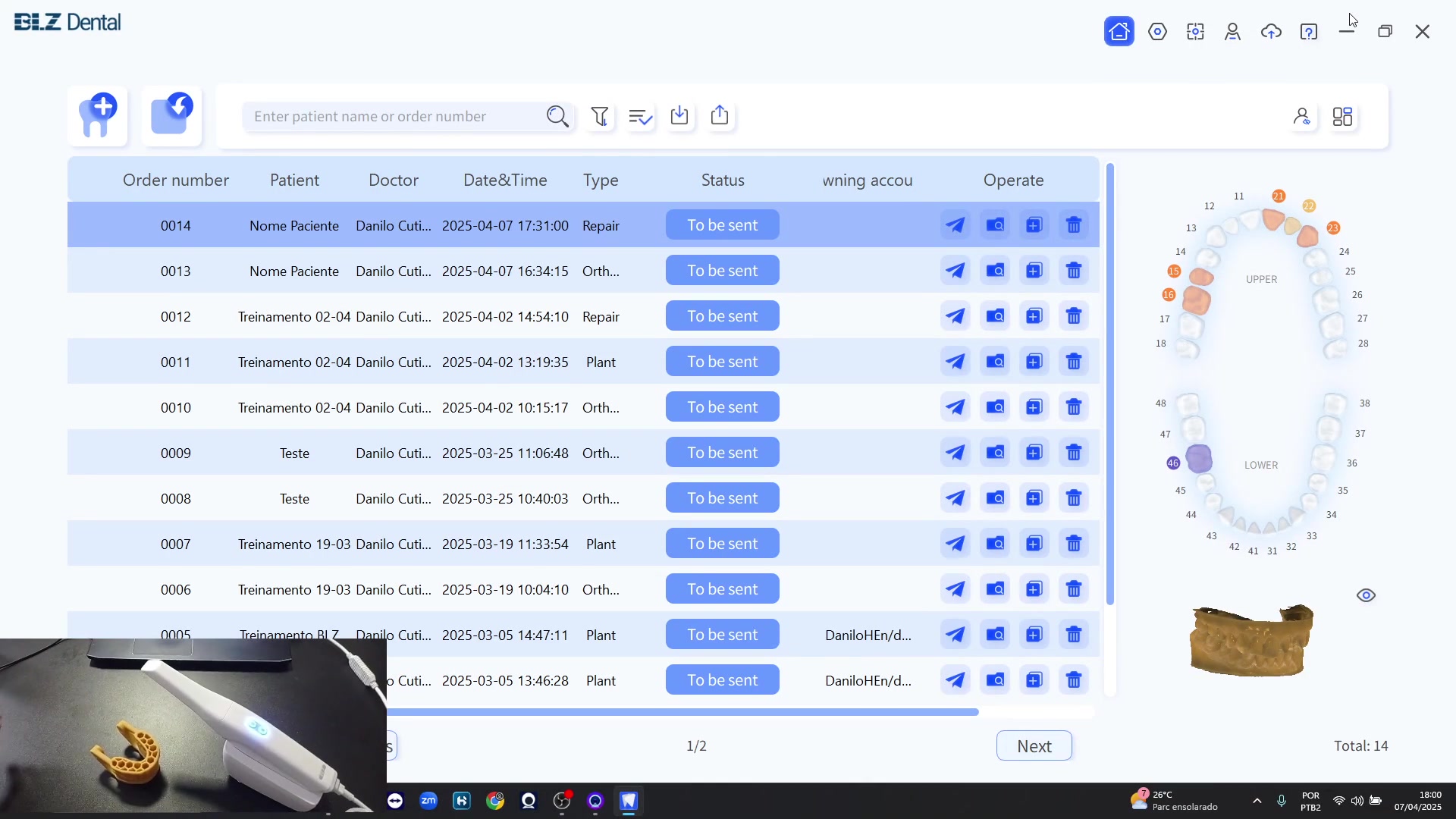
Explore dental preparation scanning with the BLZ INO200 for pre-operative cases. Watch the full demonstration at Smart Dente Academy.
Mastering Dental Preparation Scanning with Pre-operative Scenarios
📊 Quick Technical Summary
Dental preparation scanning with the BLZ INO200 Intraoral Scanner optimizes the digital workflow, allowing the capture of pre-operative and prepared scenarios, essential for planning complex dental restorations. Its ability to capture full arches in less than 40 seconds and a scanning depth of 25 mm ensure precision, integrating with an open system for compatibility with any dental CAD software.
- Weight: 270 g
- Scanning Time (Full Arch): < 40s
- Scanning Depth (Deep Scan): 25 mm
- Output Format: STL, PLY, OBJ
- Application: Pre-operative and preparation scanning
The clinical and laboratory routine is full of details. Time, for example. Every minute matters, whether in the clinic or in the prosthetic laboratory. And when the case requires a complete view, from the patient's initial situation to the final preparation, the complexity increases. It is not uncommon to feel insecure about the fidelity of a model, or frustration with rework generated by incomplete information. The need for a workflow that brings security and predictability is an obvious truth for those seeking excellence.
Imagine a patient with temporary teeth, or a removable prosthesis, and having to plan a new dental restoration. How to ensure that the new piece fits perfectly, respecting the original occlusion and vertical dimension? The answer lies in the ability to capture all these moments, without losing any detail. It is the difference between a surprising result and one that merely meets the minimum.
📋 Dental Preparation Scanning Protocol with Pre-operative Scenario
This protocol details the use of the BLZ INO200 Intraoral Scanner to capture the pre-operative situation and dental preparations, ensuring the preservation of occlusion and vertical dimension for complex planning.
Required Materials and Equipment:
- BLZ INO200 Intraoral Scanner
- BLZ Dental Software
- Training model (simulating pre-operative situation)
Step-by-Step Procedure:
- Step 1: Create New Project in Software In the BLZ Dental software, click the "new" icon (molar tooth with a plus sign). Add a new patient or select an existing one.
- Step 2: Mark Elements and Restoration Type Mark the dental element (e.g., 21) and inform the type of restoration (e.g., anatomical crown). Also, check the option for "pre-operative situation" scanning. Repeat for other elements (e.g., 23, 22 – adjusting the restoration type as needed).
- Step 3: Start Pre-operative Scanning of the Upper Arch Save the project and start scanning. Close the guidance guide. The first step will be scanning the pre-operative situation of the upper arch. This step is optional but recommended for cases with temporaries or prostheses. Perform a full arch scan, not just the region to be prepared, as the data will be utilized.
- Step 4: Data Cleaning (Optional) Use the eraser tool to eliminate unnecessary regions or unwanted data, performing a small cleanup.
- Step 5: Scan the Antagonist Arch Proceed to the next step. The software will ask for the scanning of the antagonist arch (lower, in this example). This step is crucial to preserve the occlusal relationship and vertical dimension, which can be lost after tooth wear.
- Step 6: Occlusion Registration After scanning the lower arch and eventual cleaning, proceed to the occlusion step. Scan the patient's left side, right side, and central region for accurate registration.
- Step 7: Scan the Prepared Upper Arch Proceed to the prepared upper arch scanning step. The software will ask you to select the region to be replaced. Use the virtual eraser to delete the pre-operative anatomy in the preparation area. Start scanning the neighboring teeth for location, and then scan the preparation region.
- Step 8: View and Finalize Case With the scan complete, view the processed files. You can hide or show different stages (prepared, pre-operative, antagonist). Finalize the case to save all files.
- Step 9: Access and Export Files In the case list, access the saved files (folder icon with a magnifying glass). Sort by file type. The files (lower jaw, upper jaw, set up - pre-operative) will be available for sending to the laboratory.
⚠️ Points of Attention:
- Scanning the full arch at the pre-operative stage is fundamental for subsequent alignment with the prepared arch.
- The step of scanning the antagonist arch and registering occlusion before preparation prevents the loss of important references.
- The eraser tool in the software allows for fine adjustments and elimination of unwanted data, optimizing the final model.
BLZ INO200 Intraoral Scanner: The Foundation of Digital Dentistry
The truth is that digital dentistry is no longer a luxury, but a necessity. The agility, precision, and documentation capability that a scanner like the BLZ INO200 offers transform daily practice. No more uncomfortable and error-prone impressions, or plaster models that break and take up space. From a fast and precise scan, the entire workflow gains a new dimension.
Why the BLZ INO200 stands out:
- Lightweight and Ergonomic: At just 270 g, the INO200 is designed for operator comfort, reducing fatigue during long working periods.
- Unmatched Speed: Scans full arches in less than 40 seconds. This means more time for the patient and less stress for the professional.
- Scanning Depth (Deep Scan): Reaches 25 mm, allowing the capture of hard-to-reach areas and deeper preparations with rich detail.
- Real Colors: Captures 3D models with the natural coloration of teeth and soft tissues, fundamental for diagnosis and communication with the patient.
- Open System: Compatible with STL, PLY, and OBJ formats, which guarantees total freedom to integrate with any dental CAD software and 3D printer. No dependence on closed ecosystems.
- Embedded Clinical Tools: Occlusion detection and cervical margin adjustment are examples of functionalities that enhance planning quality, optimizing communication with the prosthetic laboratory.
- Cost-Benefit: A robust solution that balances performance and accessibility, making digital dentistry a reality for more clinics and prosthetic laboratories.
To purchase the BLZ INO200 Intraoral Scanner, visit the SmartDent store.
✅ Secure Decision for the Future of Your Clinic
The ability to scan a pre-operative case, plan treatment based on precise data, and then have the security of a prepared model that perfectly aligns with the original occlusion, is an immense differential. This avoids surprises, minimizes adjustments, and optimizes chair time. It is the guarantee that crucial information for the success of the case will not be lost in the process. The decision to invest in a digital workflow that contemplates this reality is not about technology for technology's sake, but about improving patient care and practice efficiency.
It's clarity, investment security, and predictable financial return.
Ultimately, what matters is confidence in the result. The peace of mind knowing that every step of the process has been documented and that decisions were based on concrete data. Digital dentistry, with tools like the BLZ INO200 Intraoral Scanner, offers this security, allowing the professional to focus on what they do best: caring for their patients with excellence.
Vídeos relacionados
Perguntas Frequentes
What is the main application of the BLZ INO200 Intraoral Scanner?
The main application of the BLZ INO200 is the scanning of dental preparations, especially in pre-operative scenarios, to assist in the planning of complex dental restorations.
How long does the BLZ INO200 take to scan a full arch?
The BLZ INO200 scans a full arch in less than 40 seconds, streamlining the digital workflow.
What is the maximum scanning depth (Deep Scan) of the BLZ INO200?
The BLZ INO200 has a scanning depth of up to 25 mm, allowing the capture of important details in various clinical situations.
Is the BLZ INO200 compatible with other dental CAD software?
Yes, the BLZ INO200 operates on an open system, ensuring compatibility with any dental CAD software that uses STL, PLY, and OBJ output formats.
What is the main benefit of the BLZ INO200 Intraoral Scanner in dental preparation scanning?
The BLZ INO200 optimizes the digital workflow, capturing pre-operative and prepared scenarios for the planning of complex restorations.
What are the outstanding technical specifications of the BLZ INO200?
It can scan full arches in less than 40 seconds, has a scanning depth of 25 mm, and weighs 165g.
Is the BLZ INO200 compatible with other dental CAD software?
Yes, it integrates with an open system, ensuring compatibility with any dental CAD software.
What is the main application of the BLZ INO200 Intraoral Scanner?
The BLZ INO200 is ideal for scanning dental preparations, especially in pre-operative scenarios, optimizing the digital workflow for complex dental restorations.
What are the technical characteristics of the BLZ INO200?
The BLZ INO200 weighs 165g, has a scanning depth of 25 mm, and captures full arches in less than 40 seconds. It generates files in STL, PLY, and OBJ formats, being compatible with any dental CAD software due to its open system.
Is the BLZ INO200 compatible with other CAD software?
Yes, the BLZ INO200 Intraoral Scanner has an open system, ensuring compatibility with any dental CAD software available on the market.