MEDIT ClinicCAD - Inlay and Onlay
Explore STL file import within dental software, optimizing digital workflow with flexibility for various scanners and cases.

Explore STL file import within dental software, optimizing digital workflow with flexibility for various scanners and cases.
Flexibility and Precision in the Digital Dental Workflow: Importing STL Files

📊 Quick Technical Summary
MEDIT ClinicCAD's digital dentistry software allows direct import of STL files, ensuring flexibility and compatibility with various intraoral scanners. This capability optimizes the workflow for restorations such as Inlays and Onlays, integrating data from different sources for precise planning.
- Compatibility: STL files from multiple scanners
- Application: Planning of Inlays, Onlays, and other restorations
- Functionality: Visualization and manipulation of external files
- Benefit: Integration and freedom in the digital workflow
The routine of a dental office or laboratory is dynamic. The patient doesn't always arrive with a scan made with their own equipment. Often, we receive external files, coming from other scanners, from colleagues, or from partner laboratories. The truth is that dependence on a single system can become a bottleneck, limiting the flexibility and agility needed to meet growing demand. Rework, uncertainty about data compatibility, or even the hidden cost of having multiple software programs to deal with different formats are silent pains that digital dentistry professionals know well.
Imagine having to refuse a case because the scan file was generated by equipment different from yours. Or worse, spending hours converting formats, increasing the margin of error and compromising accuracy. The reality is that the digital workflow should simplify, not complicate. Interoperability between different technologies is fundamental for an efficient process, from data capture to the 3D printing phase.
📖 The Reality of Data Import in Digital Dentistry
It is a fact that not every scan is done "within the software" intended for design. We need the freedom to work with external files, from other scanners, without barriers. This is not a convenience, it is an operational necessity. Being able to open a new case – whether for an Inlay, Onlay, or any other restoration – and directly import the STL file, is what allows the work to flow without interruptions.
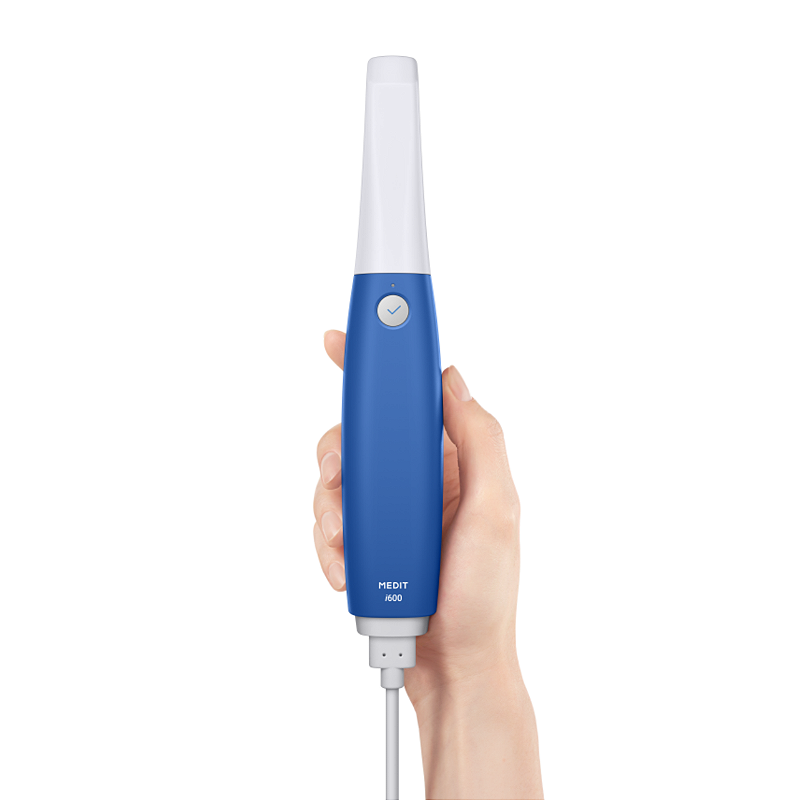
The ability to visualize and manipulate these external files within a familiar environment eliminates friction. It doesn't matter if the data came from a MEDIT i600 Intraoral Scanner, which already offers an open architecture and exports in STL, OBJ, and PLY, or from any other equipment. The important thing is that the design platform is agnostic to the source. This means that, even if the scan was not performed on the same system, the possibility of direct import ensures the continuity of the process.
The data preparation process, such as segmentation, margin definition, and adaptation, needs to be agile. If you already have the files, the logic is to pull them into the software and go straight to design. This avoids wasting time with intermediate steps and ensures that the focus is on the quality of the final work, whether for a complex Onlay or a simple veneer.
💡 The Solution at the Heart of the Workflow
It is in this context that the MEDIT ClinicCAD software fits naturally. It is not the protagonist, but the facilitator. The ability to import STL files from various scanners, such as those generated by the MEDIT i600 Intraoral Scanner, which itself already offers 10.9 μm precision for full arch and full-color scanning, becomes an operational differential. This integration allows professionals not to be tied to a single hardware brand, but rather to choose the best of each technology.
One of the biggest challenges is the adequacy and substantiation of restorations. Substation and fine-tuning tools are crucial. The possibility of visualizing the "add-on" – the areas that need more material – and making the necessary adjustments, ensures the perfect adaptation of the restoration. The logic is simple: if the software allows this flexibility, the learning curve decreases and efficiency increases. It's clarity, investment security, and predictable financial return.
🏆 MEDIT i600 Intraoral Scanner: Freedom and Precision in Your Practice
For those looking to optimize the workflow from data acquisition, the MEDIT i600 Intraoral Scanner is a strategic choice. Its unparalleled clinical precision, with an average of 10.9 μm (±0.98 μm) for full arch, ensures that the input data for any design software is of the highest quality. This translates into restorations with superior adaptation and less need for chairside adjustments.
With fast and fluid scans, reaching up to 35 FPS with continuous 3D video capture, the MEDIT i600 optimizes chair time and work efficiency. The full-color capture capability with 8-bit depth enhances anatomical reading and facilitates communication with the laboratory, making the design phase more intuitive and effective.
One of the great differentials of the MEDIT i600 is its fully open architecture, allowing the export of files in universal formats such as STL, OBJ, and PLY. This ensures unrestricted compatibility with major CAD/CAM software and 3D printers, freeing you from monthly fees and additional license costs. Weighing only 245g, it is light and ergonomic, reducing clinical fatigue and providing greater patient comfort. The 180° reversible tip optimizes intraoral access, and its autoclavable capability ensures the highest biosafety standards. The included Medit Link software, with no mandatory monthly fee, offers a complete and economical solution that transforms prosthetic rehabilitation, restorative dentistry, and orthodontics.
Invest in the freedom and efficiency of the digital workflow with the MEDIT i600.
✅ Conclusion and Expert Opinion
Interoperability is the backbone of a truly effective digital workflow. Ignoring the possibility of integrating data from different sources is to limit the potential of the clinic or laboratory itself. The ability to import STL files from any scanner, such as those generated by equipment with the precision of the MEDIT i600 Intraoral Scanner, is not just a functionality, but a premise for optimizing time and resources. It is the basis for safer and financially predictable clinical and laboratory decisions.
💡 Protect Your Clinical Reputation
Use certified materials and follow expert-validated protocols. Invest in quality digital dentistry.
Vídeos relacionados
Perguntas Frequentes
What is MEDIT ClinicCAD - Inlay and Onlay?
It is dental software that allows the import of STL files to optimize the digital workflow, especially in the planning of restorations such as Inlays and Onlays.
What are the main benefits of importing STL files in MEDIT ClinicCAD?
Importing STL files ensures flexibility and compatibility with various intraoral scanners, optimizing the workflow for precise restoration planning.
What types of files is MEDIT ClinicCAD compatible with?
The software is compatible with STL files from multiple scanners, allowing the integration of data from different sources for planning.
What is MEDIT ClinicCAD?
MEDIT ClinicCAD is digital dentistry software that allows direct import of STL files.
What are the benefits of importing STL files in MEDIT ClinicCAD?
Importing STL files into MEDIT ClinicCAD ensures flexibility and compatibility with various intraoral scanners, optimizing the workflow for restorations such as Inlays and Onlays.
For which restorations is MEDIT ClinicCAD applied?
MEDIT ClinicCAD is applied in the planning of Inlays, Onlays, and other restorations, integrating data from different sources for precise planning.
What is MEDIT ClinicCAD?
It is dental software that allows direct import of STL files, optimizing the digital workflow for restorations such as Inlays and Onlays.
What are the main benefits of MEDIT ClinicCAD in digital dentistry for Inlays and Onlays?
It offers flexibility and compatibility with various intraoral scanners, integrating data from different sources for precise planning of Inlays, Onlays, and other restorations. This enhances the workflow for indirect restorations.
What types of files does MEDIT ClinicCAD support?
The software is compatible with STL files from multiple scanners, allowing the visualization and manipulation of external data for dental planning.