BLZDental Intraoral Scanner INO 200 - All-on-X Protocol Workflow
Expert opinion, All-on-X protocol workflow intraoral scanner INo200 + DMC Device
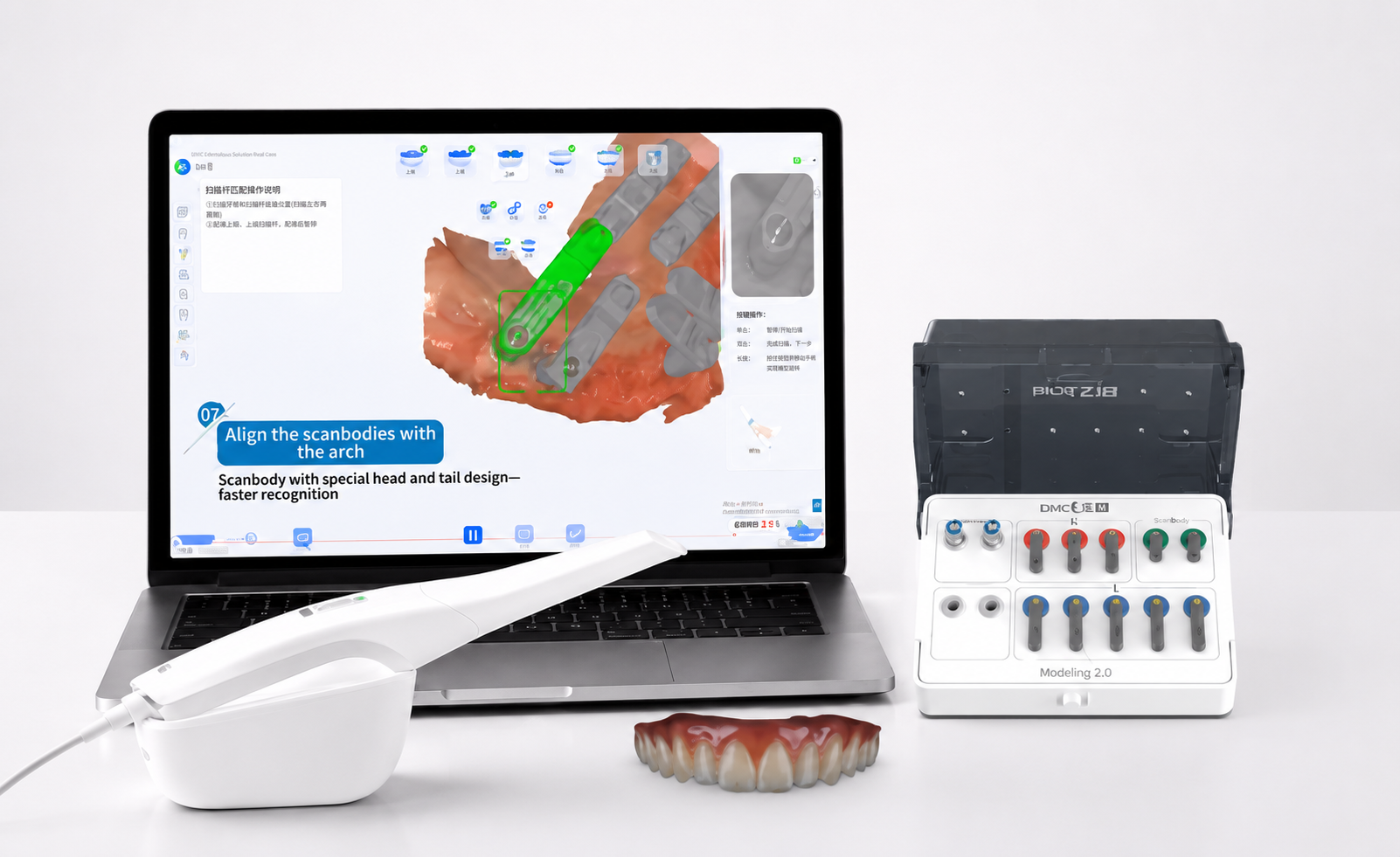
Expert opinion, All-on-X protocol workflow intraoral scanner INo200 + DMC Device
Complete Technical Guide: BLZ Ino 200 – All-on-X Workflow with DMC Kit
📊 Quick Technical Summary
The BLZ Ino 200 is a light (270 g) and fast intraoral scanner, capable of scanning a full arch in less than 40 seconds, with a Deep Scan of up to 25 mm. Its differential lies in its ability to capture challenging soft tissues and the DMC Kit for All-on-X protocols, which uses ScanBodys and dedicated AI to eliminate cumulative error in edentulous arches, ensuring micrometric precision for Protocol-type prostheses.
- Weight: 270 g
- Scanning Speed: <40 seconds (full arch)
- Capture Depth: up to 25 mm
- Key Feature: DMC Kit for All-on-X
- Compatibility: STL, PLY, OBJ (open system)
A complete technical X-ray of the intraoral scanner BLZ Ino 200 — hardware, software, the DMC Kit for implant protocols, and the experience of those who have already tested the equipment in real clinical cases.
Digital dentistry is no longer just about "having a scanner." Today, what separates a truly efficient workflow from one that only seems modern is the combination of capture precision, artificial intelligence applied to daily clinical practice, a reliable protocol for full arch cases, and the real cost of keeping the equipment operating — tips, cables, calibration. It is precisely in this set that the BLZ Ino 200 stands out.
This article gathers everything you need to know about the equipment: technical specifications, the BLZ Cloud ecosystem, the DMC Kit for implant protocols, the technical and commercial comparison with the market, and the testimony of a specialist who has already tested the scanner in clinical practice.
🔬 What the BLZ Ino 200 delivers in practice
The BLZ Ino 200 was designed to replace conventional impressions with a 100% digital workflow, without sacrificing precision, comfort, and speed. It is a light, fast scanner with a capture depth that precisely solves the points where digital dentistry often gets stuck: deep grooves, gingival margins, and soft tissues in challenging conditions.
Main technical specifications:
- Compact and lightweight design — 270 g, well below the market average, reducing professional fatigue in long appointments
- Full arch scanning in less than 40 seconds, potentially reaching 30 seconds
- Deep Scan up to 25 mm — detailed capture of deep grooves and gingival margins, a sensitive point in complex prosthetic cases
- True Color Texture Scan and HD scanning — 3D models in real colors and high definition, essential for color communication in aesthetic cases
- Open system, compatible with STL, PLY, and OBJ — free integration with Exocad, 3Shape, 3D printers, and milling machines, without commercial locks
- Detachable cable — quick replacement by the user, without sending the equipment for maintenance, reducing downtime and cost
- Calibrator included — maintains optical sensor calibration and clinical precision over time, as an absolute reference for the software
- Integrated remote control by motion/gestures
- Integrated clinical tools: occlusion detection, undercut, measurements, cervical margin adjustment (Margin Line Creation), occlusion verification, and oral health report
A little-explored differential in the market is the ability to capture soft tissues in challenging conditions — including in the presence of bleeding and sutures, a scenario where many scanners lose precision. This is especially relevant in full arch methodologies, where the fidelity of soft tissue anatomy directly impacts the final prosthetic result.
Tips: three options for each type of case
The INO 200 comes with three tip models, all removable and autoclavable, following clinical disinfection protocols:
| Tip | Dimensions | Indication |
|---|---|---|
| Standard Tip (S) | 17 mm × 15.5 mm | General scanning and daily use |
| 90° Tip (M) | 17 mm × 15.5 mm | Better access to posterior regions; ideal for complex scans and patients with reduced mouth opening |
| Mini Tip | 14 mm × 12.5 mm | Greater comfort; indicated for children, patients with reduced space, and hard-to-reach areas |
BLZ Dental Ecosystem
The INO 200 is not just capture hardware — it is the gateway to a complete clinical ecosystem, structured on four pillars: Patient Management, Cloud Storage, AI Design (automatic CAD), and Scanner Tools.
Patient Management
Organization of clinical cases, examination management, digital history, and file sharing.
Cloud Storage
Backup, security, remote access, and direct sharing with prosthetic laboratories.
AI Design - Automatic CAD (crowns in 60 seconds)
A set of artificial intelligence features that automate restoration design:
- AI Crown Design — automatic crown design
- Digital Trimming — automated digital mesh trimming
- Adjust and Verify — AI-assisted adjustment and verification
- 3D Model Creation — automatic 3D model creation
- A.I. Scanning Quality Inspection
Combined, these features allow for the automatic development of a crown in approximately 60 seconds.
Scanner Tools
- BLZ DMC Edentulous NEW (new feature)
- ScanBody Copy
- Smart Camera
- A.I. Scanbody & Abutment Matching
- Margin Line Creation
- Denture Scanning (full denture scanning)
- Multiple occlusion capture
- F.A.I. – Soft tissue filters
- HD Scanning
- Impression Scanning
- Occlusion verification
- Measurements
- Smart Stitching (intelligent alignment)
- Orthodontic simulation.
- Shade Matching
- Automatic VITA Classical shade selection;
- VITA 3D-Master selection;
- AI Shade Matching;
Key features of BLZ Cloud
- A.I. Examination Report
- Splint Design - creation of occlusal splints
- 3D Model making - automatic 3D model creation
Key features of BLZ Cloud
- Total integration: direct synchronization with BLZ brand scanners, especially the BLZ INO200 model.
- Agile communication: immediate sending of 3D files and exams between the dentist's office and the prosthetic laboratory.
- Multiplatform access: upload, viewing, and downloading of digital impressions from any internet-connected device.
- Mobility and security: protection of clinical data in compliance with the demands of modern digital dentistry.
Innovation in dental design with AI (on the BLZ Cloud platform)
In addition to connecting clinic and laboratory, the BLZ Cloud hosts an AI-assisted dental design system, structured on five pillars:
- Consistent quality and personalized design Absolute predictability in results, following the rules and style defined by the user.
Smart workflow in six steps
- Steps 1 to 3 — Upload, Trimming, and Design: universal scanner compatibility, precise margin/insertion axis adjustment, and intelligent crown generation by AI in about one minute.
- Steps 4 to 6 — Adjustment, Modeling, and Download: full control over sculpting and occlusion, automatic generation of dies/3D models, and secure download.
Advanced features and resources
- Segmented margin submersion: exclusive tool for flexible and secure adaptation in cases of preparations without a clear finish line.
- Clinical validation and batch processing: physical verification by real-time heat maps, with the ability to process multiple orders simultaneously in the background.
Infrastructure models and investment policy
- Installation options (local vs. cloud): Client version for advanced offline control, and Web version for agility without requiring powerful hardware.
Clinical applications
The equipment is indicated for a wide range of treatments: restorative dentistry, fixed and removable prosthetics, implants, orthodontics, invisible aligners, oral rehabilitation, veneers, dental contact lenses, crowns, bridges, full and partial dentures, and digital surgical planning.
What is the DMC Kit?
If there's one step that has historically hindered the digital workflow in dentistry, it's scanning fully edentulous patients. The reason is simple: the gum is a smooth, extensive surface without stable anatomical reference points. Without "landmarks" for the software to orient itself, the scanner constantly loses tracking — and each new attempt to read accumulates more geometric error in the final mesh. In a Protocol-type prosthesis, where the bar needs to passively seat on multiple implants, this accumulated error is what generates endless adjustment sessions, bar soldering, and laboratory rework.
The DMC Kit from BLZ Dental was developed precisely to solve this bottleneck. The logic is to replace scanning a large, reference-less area with a set of temporary geometric anchor points — the ScanBodys — positioned over the implants or mini-pillars. Instead of scanning the entire mucosa, the scanner focuses only on the heads of these ScanBodys, which have a high-contrast optical design instantly recognized by the algorithm.
How the system works, in summary:
- A proprietary BLZ STL library is imported into the software before scanning, and the system cross-references the live-captured mesh with this factory-calibrated library.
- A dedicated AI engine acts in real-time, filtering mobile soft tissues (tongue, cheek) and removing optical noise from the capture — drastically reducing the need for manual mesh rework.
- Since the scanner anchors the reading by the ScanBodys (which do not move) instead of the mucosa (which moves and has no reference), the cumulative error tends to zero, even in extensive full arches.
- The system is compatible with the main implant systems on the market — it is not a closed solution for a specific brand.
Available ScanBody sizes
The ScanBodys of the DMC Kit are divided by anatomical application region, and the professional combines the sizes in the same arch according to the position:
| Type | Region of use |
|---|---|
| Standard Tip (S) | General scanning and daily use |
| 90° Tip (M) | Better access to posterior regions |
| Mini Tip | Greater comfort; indicated for children and reduced space |
Technical note: part of the BLZ documentation also references a variation of three sizes — Small (P), Medium (M), and Large (G) — for fine fitting in different arch widths. In clinical practice, the logic of use is the same: smaller sizes in the anterior region, larger in the posterior, always seeking the best fit without creating tension or overlap between components.
The installation rule is always the same: the heads of the ScanBodys must be as close as possible to each other, converging, forming the "optimized reading block" that allows the software to calculate the distance and angulation between the implants with micrometric precision.
DMC vs. traditional workflow with scanbody
| Characteristic | Traditional workflow with scanbody | BLZ DMC System |
|---|---|---|
| Scanning area | Total scanning of smooth mucosa, generating stitching distortions | Restricted focus on ScanBody heads |
| Precision in protocol | High error rate in full arches, due to lack of fixed points | Practically zero cumulative error, due to AI calibration |
| Compatibility | Often limited to specific brands | Compatible with the main implant systems on the market |
| Chair time | High — multiple reading attempts and failure correction | Reduced — intelligent block capture |
The DMC ecosystem is integrated with BLZ's own scanners — including the BLZ Ino 200 — taking advantage of the equipment's depth of field of up to 25 mm and fine scanning tips to reach complex interproximal areas without losing optical tracking.
It is this set — dedicated scanbody hardware, AI soft tissue filtering, and calibrated library — that allows the DMC Kit to deliver a file ready for definitive bar milling or immediate load protocol printing with passive seating, without relying on luck when registering a fully edentulous arch.
📋 Scanning Implant Protocols with DMC: step-by-step
Scanning an Implant Protocol case with the DMC Kit follows a fixed sequence of 5 steps. Each exists to eliminate a specific type of error that has historically compromised this type of rehabilitation:
Step-by-step Procedure:
- Step 1: ScanBodys Scanning (Photogrammetry) With the ScanBodys installed on the implants or mini-pillars and their tips converging — as close as possible, without touching or overlapping — capture begins, focusing only on the heads of the devices. The software performs automatic recognition (auto-match) with the system's digital library, determining the exact distance and angulation between the implants. Before proceeding, confirm that the mesh fit is perfect.
- Step 2: Ridge scanning with ScanBodys in position With the devices still installed, a quick capture is performed that includes the base of the ScanBodys and a strip of the adjacent ridge. This step informs the software where the implant set is positioned in relation to the arch anatomy — without it, the system knows the distance between the implants, but does not know where they are positioned in the patient's mouth.
- Step 3: Complementary soft tissue scanning (without ScanBodys) The devices are removed, and capture continues from a region already digitized in previous steps, filling in areas that were obstructed or shadowed by the components. It is not necessary to rescan the entire arch — only the complement of soft tissue not yet covered, ensuring a clean model of the edentulous ridge.
- Step 4: Antagonist arch scanning Conventional capture of the opposing arch is performed. Since it is only the antagonist, a simplified capture of the occlusal and incisal surfaces is sufficient. The software's cutting tool helps remove unwanted soft tissues (tongue, cheek) from the mesh.
- Step 5: Occlusal registration Finally, the patient's real maxillomandibular relationship is transferred — either by functional double impression (360° scanning that joins the internal and external faces of the record), by wax rim, or by the patient's existing full denture. The software cross-references this data and positions the digital models at the correct Vertical Dimension of Occlusion (VDO).
The final result, after verifying the intermaxillary relationship, is the export of files in open format (STL/PLY/OBJ) directly to the dental CAD software — such as Exocad — ready for the design of the protocol bar, whether for immediate load or for the definitive metal/zirconia structure, with passive seating from the first attempt.
Technical and commercial comparison with the market
The table below positions the BLZ Ino 200 / Ino 100 Plus against the main market competitors on the criteria that weigh most heavily in the purchasing decision: performance, AI features, and maintenance cost.
| Characteristic | Medit i600 | Medit i700 | Medit i700 Wireless | BLZ Ino 200 / Ino 100 Plus | Medit i900 |
|---|---|---|---|---|---|
| Category | Intermediate | Advanced | Advanced Premium | Advanced Premium | Advanced Premium |
| Connectivity | USB Cable | USB Cable | Wireless (battery) | USB Cable | USB Cable |
| Speed (FPS) | 35 FPS | 70 FPS | 70 FPS | 40 FPS | 90 FPS |
| Weight | 245 g | 245 g | 328 g (battery) | 270 g | 270 g |
| Remote control | No | Yes (joystick) | Yes (joystick) | Yes (motion/gestures) | Yes (motion) |
| Advanced AI engine | ❌ | ❌ | ❌ | ✔ | ✔ |
| Gesture control | ❌ | ❌ | ❌ | ✔ | ✔ |
| AI clinical reports | ❌ | ❌ | ❌ | ✔ | ✔ |
| Smart Color Filtering (color/glove filter) | ✔ | ✔ | ✔ | ❌ | ✔ |
| Smart Scan Filtering, Stitching and Scan Guide | ✔ | ✔ | ✔ | ✔ | ✔ |
| Clinical workflows | Prosthetics, Pre-Op, Denture | Complete | Complete + mobility | Complete + All-on-X protocol | Complete + advanced aesthetics |
| Tip price | R$ 825 | R$ 825 | R$ 3,500 | R$ 400 | R$ 825 |
| Cable price | R$ 2,200 | R$ 2,200 | R$ 2,200 | R$ 260 | R$ 2,200 |
| Battery price | — | — | R$ 3,500 | — | — |
What this comparison shows, in practice
Where the BLZ Ino 200 stands out:
- Advanced AI engine, gesture control, and intelligent clinical reports — features only present in top-of-the-line market models, and not in the entire "advanced" category.
- Significantly lower maintenance cost: the tip costs R$ 400 and the cable costs R$ 260. In continuous clinical use, tips and cables are frequent replacement items — this price difference translates into real savings over time, not just in the initial acquisition cost.
- All-on-X protocol workflow with the DMC Kit dedicated to fully edentulous arches, including photogrammetry by ScanBodys and practically zero cumulative error.
- Extensive AI ecosystem in daily clinical practice: automatic crown design in ~60 seconds (AI Crown Design), automated digital trimming (Digital Trimming), and AI-assisted adjustment/verification — features that go beyond simple mesh capture.
- The lightest in the advanced premium category, which translates into less fatigue in long appointments.
- Three interchangeable tips (Standard, 90°, and Mini Tip), including an option designed for children and reduced spaces.
In summary: the BLZ Ino 200 delivers premium-level AI and workflow features, a complete clinical ecosystem, and a significantly lower maintenance cost. For clinics with high scanning volume — where the cost of tip and cable replacement impacts cash flow — this is an equation that pays off.
✅ Conclusion and Expert Opinion
The BLZ Ino 200 does not just compete on price — it enters the conversation of advanced premium category scanners with artificial intelligence features that, until now, only appeared in much more expensive equipment to maintain. For clinics and prosthetic laboratories that serve both single cases and full rehabilitations, and that seek to reduce the recurring cost of tips and cables without giving up an AI engine, gesture control, and intelligent clinical reports, it is an option that deserves to be on the decision table.
💡 Protect Your Clinical Reputation
Use certified materials and follow expert-validated protocols. Invest in quality digital dentistry.
Vídeos relacionados


Perguntas Frequentes
What is the weight and scanning speed of the BLZ Ino 200?
The BLZ Ino 200 weighs 165 g, making it one of the lightest scanners in its category, contributing to reduced professional fatigue during long appointments. In terms of speed, it is capable of scanning a full arch in less than 40 seconds, potentially reaching 30 seconds under ideal conditions. This combination of lightness and speed optimizes the clinical workflow, making the capture process more efficient and comfortable for both the patient and the operator.
How does the BLZ Ino 200's DMC Kit solve the problem of scanning in edentulous patients?
The DMC Kit addresses the challenge of scanning edentulous patients, where the absence of stable anatomical references in the gingiva makes tracking difficult. It uses ScanBodys, which are temporary geometric anchor points positioned over the implants. Instead of scanning the mucosa, the scanner focuses on the heads of these ScanBodys, which have a high-contrast optical design. A proprietary STL library and a dedicated AI engine filter soft tissues and noise, ensuring that cumulative error is practically zero, even in extensive full arches.
What are the main clinical tools integrated into the BLZ Ino 200?
The BLZ Ino 200 offers a range of integrated clinical tools to optimize diagnosis and planning. This includes occlusion detection, undercut identification, precise measurements, cervical margin adjustment (Margin Line Creation), occlusion verification, and the ability to generate oral health reports. Additionally, it features Smart Scan Guide for real-time guidance, multiple occlusion capture, soft tissue filters (F.A.I.), and HD scanning, which enhance the quality and versatility of digital capture.
What are the differentiators of the BLZ Ino 200 regarding maintenance cost?
One of the major differentiators of the BLZ Ino 200 is its significantly lower maintenance cost compared to other premium scanners on the market. The BLZ Ino 200 tip costs R$ 400, while the cable costs R$ 260. In contrast, competitors may have tips costing R$ 825 or even R$ 3,500, and cables at R$ 2,200. This price difference in frequently replaced items represents real and substantial savings over time for clinics with high scanning volumes.
How is artificial intelligence applied in the BLZ Dental ecosystem for restoration design?
The BLZ Dental ecosystem integrates AI to automate and optimize the design of restorations, especially crowns. Features like AI Crown Design allow for automatic crown design in approximately 60 seconds. Digital Trimming performs automated digital mesh trimming, and Adjust and Verify offers AI-assisted adjustment and verification. AI also assists in the automatic creation of 3D models and scanning quality inspection, streamlining the CAD/CAM workflow and ensuring predictability in results.
What tip options are available for the INO 200 and their indications?
The INO 200 offers three models of removable and autoclavable tips for different clinical needs. The Standard Tip (17 mm × 15.5 mm) is indicated for general scanning and daily use. The 90° Tip (17 mm × 15.5 mm) provides better access to posterior regions and is ideal for complex scans or patients with reduced mouth opening. The Mini Tip (14 mm × 12.5 mm) offers greater comfort, being recommended for children, patients with reduced space, and hard-to-reach areas, ensuring versatility and clinical adaptability.
What file formats and CAD/CAM software is the BLZ Ino 200 compatible with?
The BLZ Ino 200 operates as an open system, ensuring broad compatibility and flexibility for the professional. It is compatible with STL, PLY, and OBJ file formats, which are standards in digital dentistry. This feature allows for free integration with major CAD/CAM software on the market, such as Exocad and 3Shape, as well as being compatible with various 3D printers and milling machines, without commercial locks. This facilitates the incorporation of the scanner into existing digital workflows.
What clinical applications are covered by the BLZ Ino 200?
The BLZ Ino 200 is a versatile equipment, indicated for a wide range of dental treatments. Its applications include restorative dentistry, fixed and removable prosthetics, implants, orthodontics, planning and fabrication of invisible aligners, oral rehabilitation, veneers, dental contact lenses, crowns, bridges, full and partial dentures, and digital surgical planning. This breadth makes it a valuable tool for various specialties and clinical needs.
What are the main features of BLZ Cloud for clinical management and communication?
The BLZ Cloud is a complete ecosystem that offers essential resources for management and communication in the dental clinic. It provides total integration with BLZ scanners, synchronizing data directly. It facilitates agile communication, allowing immediate sending of 3D files and exams between the office and the prosthetic laboratory. Additionally, it offers multiplatform access for uploading, viewing, and downloading digital impressions from any device, ensuring mobility and security in clinical data protection.
What is the importance of the BLZ Ino 200's challenging soft tissue capture capability?
The ability to capture soft tissues in challenging conditions, such as in the presence of bleeding and sutures, is a critical differentiator of the BLZ Ino 200. Many scanners lose accuracy in these scenarios, but the Ino 200 maintains capture fidelity. This is particularly relevant in full arch methodologies, where the precision of soft tissue anatomy directly impacts passive seating and the final prosthetic result. This functionality minimizes rework and optimizes clinical predictability.
What is the BLZ Ino 200?
The BLZ Ino 200 is a light and fast intraoral scanner, capable of scanning a full arch in less than 40 seconds, with a capture depth of up to 25 mm.
What is the differential of the BLZ Ino 200 for All-on-X protocols?
Its differential is the ability to capture challenging soft tissues and the use of the DMC Kit for All-on-X protocols, which uses ScanBodys and dedicated AI to eliminate errors in edentulous arches.
How does the DMC Kit contribute to precision in the All-on-X workflow?
The DMC Kit, with ScanBodys and artificial intelligence, ensures micrometric precision by eliminating cumulative error in edentulous arches, essential for Protocol-type prostheses.
What file formats are compatible with the BLZ Ino 200?
The BLZ Ino 200 is compatible with STL, PLY, and OBJ file formats, which ensures an open system for integration.
What is the main differential of the BLZ Ino 200 intraoral scanner?
The main differential of the BLZ Ino 200 is its ability to capture challenging soft tissues and the dedicated DMC Kit for All-on-X protocols, which uses ScanBodys and AI.
How long does the BLZ Ino 200 take to scan a full arch?
The BLZ Ino 200 is capable of scanning a full arch in less than 40 seconds. This makes it a fast and efficient device for the clinical workflow.
What does the DMC Kit offer for All-on-X protocols?
The DMC Kit, in conjunction with the BLZ Ino 200, uses ScanBodys and artificial intelligence to eliminate cumulative error in edentulous arches. This ensures micrometric precision for the fabrication of Protocol-type prostheses.
What file formats does the BLZ Ino 200 support?
The BLZ Ino 200 is an open system, compatible with STL, PLY, and OBJ file formats, which facilitates integration with different CAD/CAM software.
What is the main differential of the BLZ Ino 200 intraoral scanner?
The differential of the BLZ Ino 200 lies in its ability to capture challenging soft tissues and the DMC Kit for All-on-X protocols.
How long does the BLZ Ino 200 take to scan a full arch?
The BLZ Ino 200 is capable of scanning a full arch in less than 40 seconds.
What is the main function of the DMC Kit in the All-on-X workflow with the BLZ Ino 200?
The DMC Kit uses ScanBodys and dedicated AI to eliminate cumulative error in edentulous arches, ensuring micrometric precision for Protocol-type prostheses.
What is the main differential of the BLZ Ino 200 for All-on-X protocols?
The main differential for the BLZ Ino 200 for All-on-X protocols is its ability to capture challenging soft tissues and the use of the DMC Kit, which utilizes ScanBodys and dedicated AI to eliminate cumulative error in edentulous arches, ensuring micrometric precision for Protocol-type prostheses.
What are the weight and speed specifications of the BLZ Ino 200?
The BLZ Ino 200 weighs 165g and is capable of scanning a full arch in less than 40 seconds.
What is the capture depth of the BLZ Ino 200?
The BLZ Ino 200 intraoral scanner has a capture depth of up to 25 mm.